Short answer: To prepare a UAE VAT 201 return, total standard-rated sales by the Emirate where the supplying branch is located, add reverse-charge imports, list zero-rated and exempt supplies, then total recoverable input VAT, leaving out blocked items. Check supplier TRNs and export evidence first. An AI agent can prepare the box-by-box working for you to file on EmaraTax.
The VAT 201 form is short. The work is in the registers behind it: which Emirate a sale belongs to, whether an export has its evidence, and which input VAT is blocked.
Here is the box-by-box method from a recent tutorial, then an agent preparing the working for a quarter.
The tutorial this is based on
UAE VAT Return Filing 2026 | Step by Step FTA VAT Filing Guide | Avoid Common VAT Mistakes by CA M F Khan (Export & Global Tax Expert), published 26 May 2026. It goes through the return box by box with example figures, starting from an Excel copy of the return.
How do you prepare the UAE VAT 201 return?
- Prepare a copy of the return in Excel from your accounting software before you open EmaraTax.
- Boxes 1a to 1g: standard-rated supplies by the Emirate where your business or branch is located, not the customer's Emirate.
- Box 3: imported services under reverse charge. Box 4: zero-rated supplies such as exports. Box 5: exempt supplies.
- Box 6: goods imported through customs, which the FTA pre-fills from customs data.
- Box 9: standard-rated expenses and recoverable input VAT. Box 10: reverse-charge input VAT on boxes 3 and 6.
- On EmaraTax, open the return for the period, enter the figures, review the summary and submit.
Where it usually goes wrong
- A sale coded to the customer's Emirate instead of the branch that supplied it.
- An export treated as zero-rated with no exit evidence on file.
- Input VAT on client entertainment included in box 9.
- A supplier invoice with an invalid TRN.
- An imported service with no reverse charge recorded.
How an AI agent does it from Slack
We gave the agent the sales register and the purchase register (with imported services and customs declarations) for the quarter ended 30 September 2026, for a made-up interiors trader with branches in Dubai and Abu Dhabi. Every company, name, tax number and amount in these files is made up. The agent works in Slack, where it shows up as Mnemio AI, because Accountant AI is built on Mnemio AI.
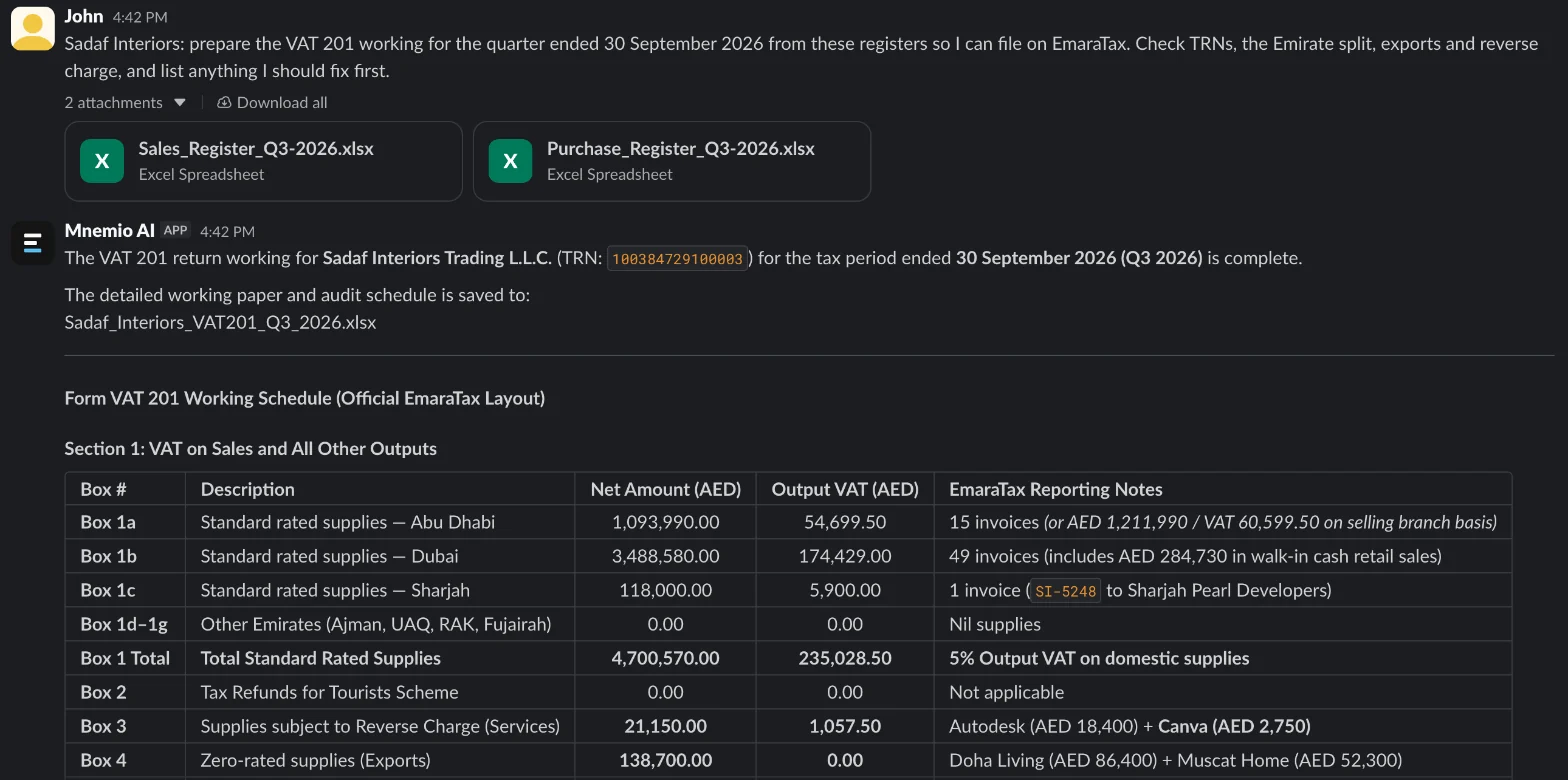
What the agent did
- Prepared every box of the return from the two registers, and saved the working as an Excel workbook.
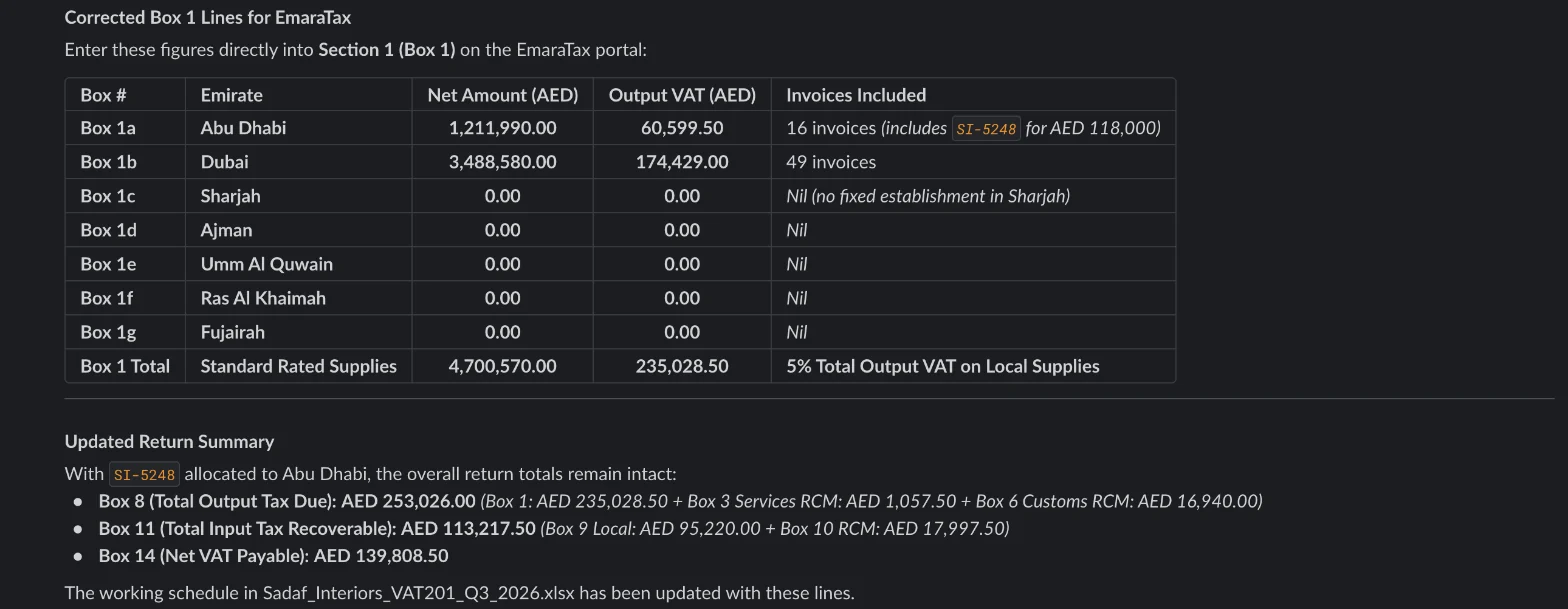
- Its first box 1 followed the Emirate coded in the sales register, which put SI-5248 under Sharjah, and noted the selling-branch figures beside it. Asked which basis was right, it confirmed the selling branch and sent corrected box 1 lines with the sale under Abu Dhabi.
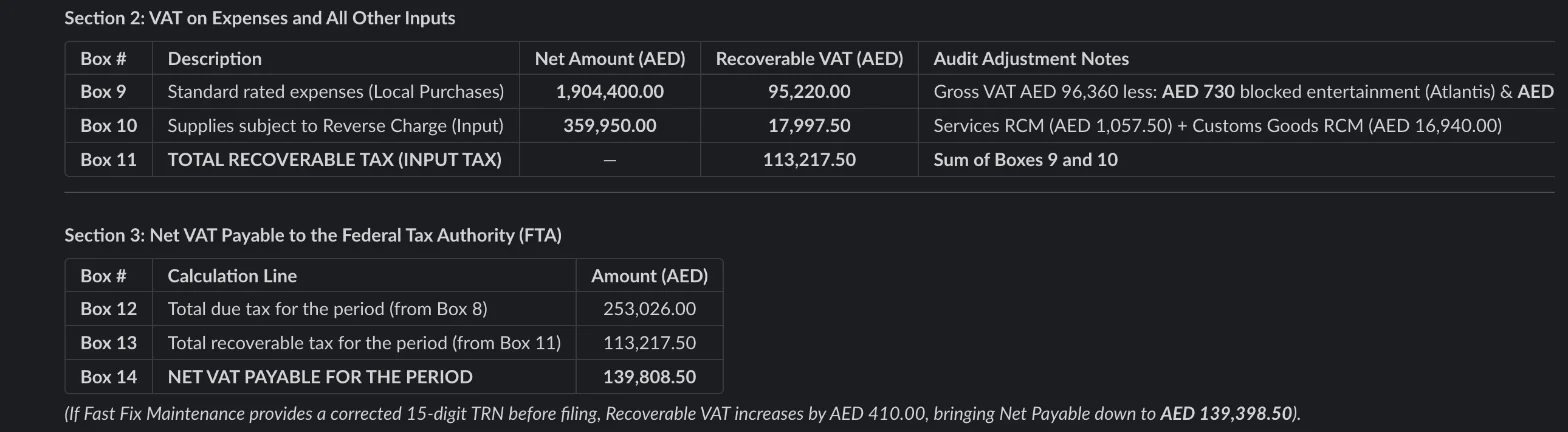
- Checked supplier TRNs and held the input VAT on an invoice whose TRN has 14 digits.
- Checked each export for exit evidence.
- Removed the client-dinner VAT from box 9.
- Added the reverse charge missing on one imported service, and prepared boxes 3, 6 and 10.
- Worked out the net VAT payable, AED 139,808.50, and left filing to you.
What it found
| Exception | Document | Amount (AED) | Treatment |
|---|---|---|---|
| Sale coded to the customer's Emirate | SI-5248 | 118,000.00 | Moved to Abu Dhabi, where the selling branch is (after the follow-up) |
| Export with no exit evidence | SI-5261 | 52,300.00 | Get the evidence, or treat it as standard-rated |
| Client entertainment in box 9 | ATL-88120 | 730.00 VAT | Blocked; removed from input VAT |
| Supplier TRN has 14 digits | FF-2207 | 410.00 VAT | Held until a valid tax invoice arrives |
| Imported service with no reverse charge | CV-20931 | 137.50 VAT | Added to boxes 3 and 10 |
| Net VAT payable | Box 14 | 139,808.50 | 139,398.50 if the valid invoice arrives before filing |
What you still check
- Which Emirate each branch's sales go under, before you rely on the box 1 split.
- Whether exit evidence for the export can be obtained in time.
- The blocked-input decision for each expense the agent flagged.
- Any article or rule the agent quotes, against the FTA's own guidance.
- The final figures on EmaraTax, which you enter and submit yourself.
Questions accountants ask
Which Emirate does a sale go under in box 1?
The Emirate where the supplying business or branch is located, not where the customer is.
Does the agent log in to EmaraTax?
Filing stays with you. If you want it to read something on the portal, you sign in yourself in the agent's browser window, and it asks before it changes or submits anything.
Can it do this every quarter?
Yes. Agents can run on a schedule, so the working can be ready a week before each return is due.
Hand this job to an agent
Bring one of your own files to a 30-minute call and watch an agent do it.
Book a 30-min demo