Short answer: To reconcile a bank account in TallyPrime, import the bank statement as Excel, accept the matches Tally offers, fix entries that are a rupee or two off, pass vouchers for bank-only lines such as charges, EMIs and UPI receipts, and confirm the two balances agree. An AI agent can do the matching and draft the BRS for your review.
Bank reconciliation is the first job of every month-end, and in a busy firm it is also the one most often pushed to the 10th. TallyPrime 7 made it faster with automatic matching, but someone still has to work through the lines it can't match.
Below is the manual method, based on a recent TallyPrime tutorial, followed by a real run where an AI agent did the same reconciliation from one Slack message.
The tutorial this is based on
1 Click Auto Bank Reconciliation in Tally Prime 7.0 | New Feature by Accounts Advice (Diya Patel), published 18 June 2026 (in Hindi). It walks through TallyPrime's automatic matching, including the cases it cannot match on its own.
How do you do bank reconciliation in TallyPrime by hand?
- Open the bank ledger in Alter mode and turn on the bank reconciliation settings. Check that the opening balance agrees with last month's closing balance.
- Download the month's bank statement in Excel, with date, narration, withdrawal, deposit and balance columns.
- Go to Banking > Import Bank Statement and choose the bank, the file and its format.
- Open the bank reconciliation summary. Book entries and bank lines for the unreconciled period are shown together.
- Accept the matches Tally proposes. For near-misses, such as a payment entered as 9,215 that the bank shows as 9,216, correct the voucher so it matches.
- Pass vouchers for lines that are only in the bank: one consolidated receipt for small UPI collections, and single vouchers for charges, EMIs and receipts from parties you don't recognise.
- Reconcile, then compare the balance as per books with the balance as per bank. If a gap remains, go back to the opening balance or the previous month.
Where it usually goes wrong
- A payment entered twice. Tally matches one copy and the other stays unreconciled for months.
- Amounts that differ by a rupee, which automatic matching does not offer as a match.
- Dozens of small UPI receipts that nobody books, because each one is too small to chase.
- Receipts with no party name in the narration. They need a suspense entry and a question to the client, not a guess.
- Loan EMIs debited by NACH and posted entirely to the loan account, leaving out the interest.
How an AI agent does it from Slack
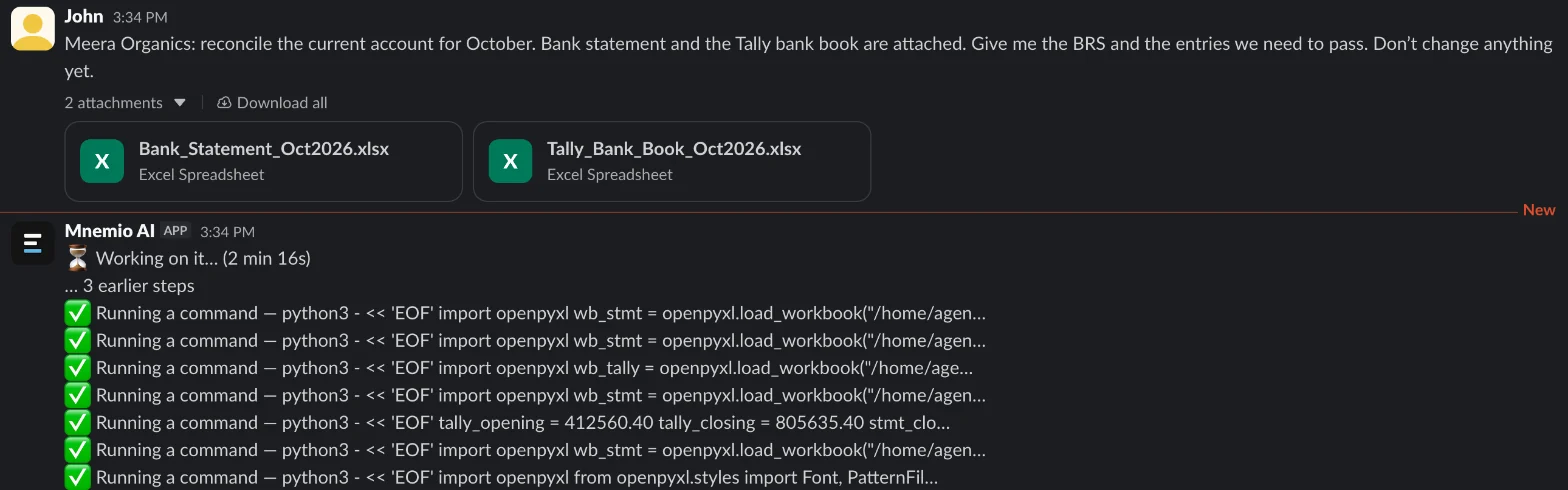
We gave an agent two Excel files for a made-up company, Meera Organics: October's bank statement (55 lines) and the bank book exported from Tally (47 vouchers). We planted the usual problems: a duplicate payment, a one-rupee difference, UPI receipts, a loan EMI, bank charges and a receipt from an unknown party. Every company, name, tax number and amount in these files is made up. The agent works in Slack, where it shows up as Mnemio AI, because Accountant AI is built on Mnemio AI.
What the agent did
- Read both files and checked that the opening balance (₹4,12,560.40) is the same on both sides.
- Matched 42 lines one to one by date, amount and cheque or reference number.
- Flagged the near-misses: a receipt booked as ₹18,100 that the bank shows as ₹11,800, and a payment that is ₹1 off.
- Found that payment voucher PMT-2300 repeats PMT-2218 (Om Sai Transport, ₹68,340).
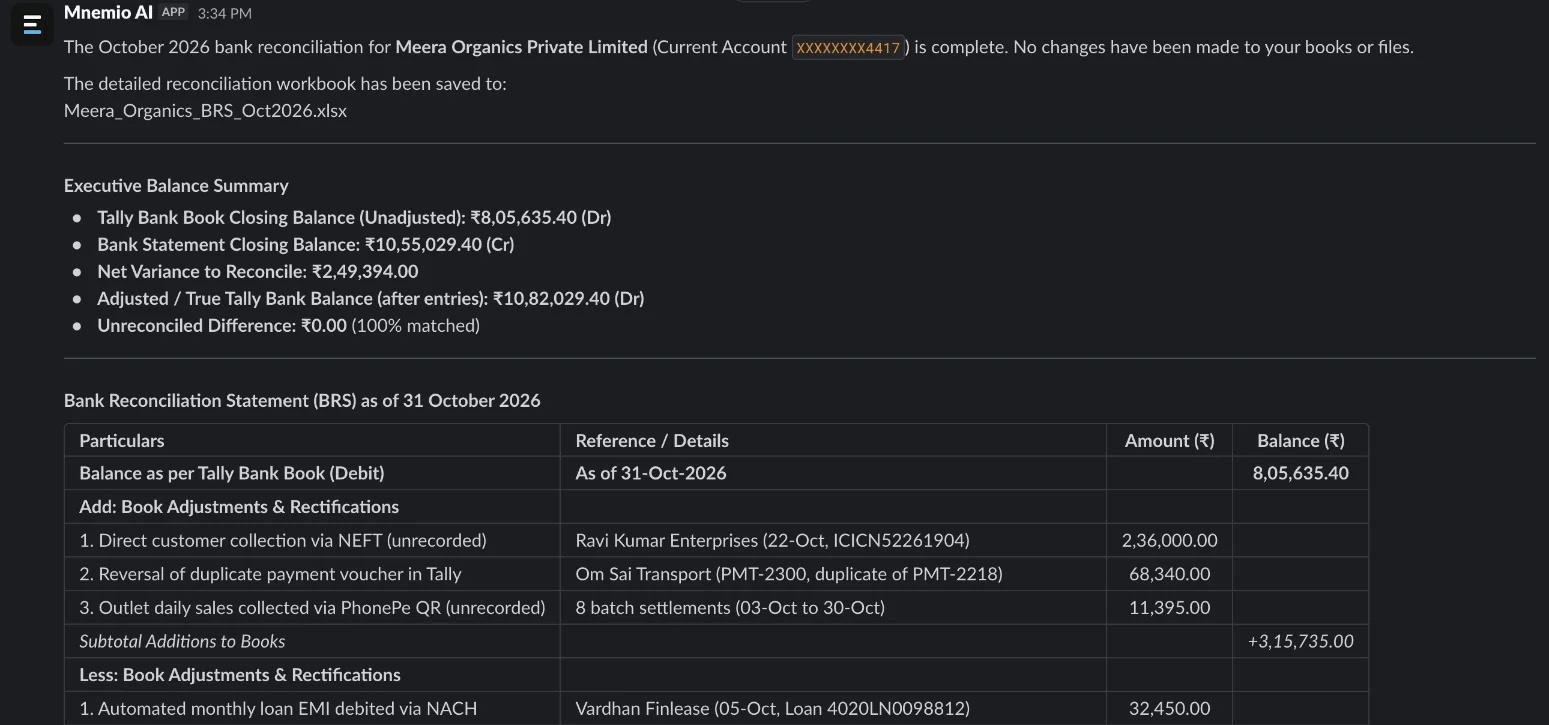
- Listed the bank-only lines: charges, the NACH loan EMI, eight PhonePe settlements and a ₹2,36,000 NEFT receipt from a party not in the books.
- Built the BRS in a workbook and listed the entries to pass, without changing anything.
What it found
| Item | Amount (₹) | What to do |
|---|---|---|
| Cheque issued, not yet presented | 48,000.00 | Nothing to pass; it should clear next month |
| Deposit in transit on 31 October | 75,000.00 | Nothing to pass; check that it clears |
| Bank charges with GST | 590.00 | Pass a bank charges entry |
| Loan EMI debited by NACH | 32,450.00 | Pass it, splitting principal and interest from the loan schedule |
| Eight PhonePe UPI settlements | 11,395.00 | One consolidated receipt |
| NEFT receipt from an unknown party | 2,36,000.00 | Park in suspense and ask the client who paid |
| Receipt booked as 18,100; bank shows 11,800 | 6,300.00 | Correct the voucher |
| Duplicate payment PMT-2300 | 68,340.00 | Delete the duplicate |
| Payment off by one rupee | 1.00 | Correct the voucher to 9,216 |
What you still check
- Who the ₹2,36,000 receipt came from, before it leaves suspense.
- The split of the EMI between principal and interest, against the lender's schedule.
- The vouchers themselves before anyone passes them. The agent proposes them; it does not post them.
Questions accountants ask
Can TallyPrime import a PDF bank statement?
In the tutorial, the statement had to be in Excel. Most banks let you download Excel or CSV from net banking. If you only have a PDF, an agent can read it and turn it into a clean Excel file first.
Does the agent post the entries in Tally?
No. It prepares the BRS and the list of entries, and asks before anything is changed. Tally works through Excel or XML imports, so once you approve, the entries can be prepared as an import file.
What if the opening balance doesn't match?
Fix last month first. A wrong opening balance makes every later month look unreconciled, which is why the agent checks it before matching anything.
Can it reconcile several bank accounts at once?
Yes. Give it one statement and one bank book per account, or put them in a shared folder, and it works through them one by one. It can also run on a schedule, for example on the 2nd of every month.
Hand this job to an agent
Bring one of your own files to a 30-minute call and watch an agent do it.
Book a 30-min demo