Short answer: A month-end close in QuickBooks Online means clearing the bank feed, reconciling every bank, card and loan account, reviewing AP and AR aging, checking the balance sheet before the P&L, and then setting a closing date. An AI agent can run this checklist on your QBO exports and tell you exactly what is blocking the close.
Most bookkeepers have a close checklist. The hard part is running it every month for every client, and catching the problems that hide between reports, such as a bill that was paid by card but is still open in AP.
Here is the checklist from a recent QuickBooks Online tutorial, then an agent running it on a month of exports.
The tutorial this is based on
How to Do a Month-End Close in QuickBooks Online (Step by Step) by Accrual Mistress Bookkeeping & Consulting, published 25 September 2026. A real close done on screen, in an order you can follow every month.
How do you close the month in QuickBooks Online?
- In Bank transactions, make sure every bank and card line up to month-end is categorised or matched.
- Check the reconciliation reports: every bank, card and loan account should be reconciled to the statement date. For loans, book the interest part of each payment.
- Review the AP aging and ask of every old bill: is it still owed, paid outside QuickBooks, or entered twice?
- Review the AR aging for unapplied payments and invoices to write off.
- Review the balance sheet before the P&L. Look for negative balances, a bank balance that differs from the statement and loan balances that differ from the lender.
- Review the P&L for misclassifications, such as equipment posted to office supplies.
- Close the books: set the closing date in Advanced settings and require a warning (or a password) for changes.
Where it usually goes wrong
- A loan payment posted entirely to principal, so interest expense is missing.
- A bill paid by credit card, where the card charge was coded to an expense and the bill stays open. The expense is counted twice.
- A customer payment received but not applied to the open invoice.
- A negative Undeposited Funds balance.
- A laptop or other equipment expensed instead of capitalised.
How an AI agent does it from Slack
We gave the agent a workbook of QuickBooks Online exports for a made-up design firm, Harbor & Pine Interiors (bank feed items, reconciliation status, AP and AR aging, card transactions, balance sheet and P&L by month), and the lender's loan statement. Every company, name, tax number and amount in these files is made up. The agent works in Slack, where it shows up as Mnemio AI, because Accountant AI is built on Mnemio AI.
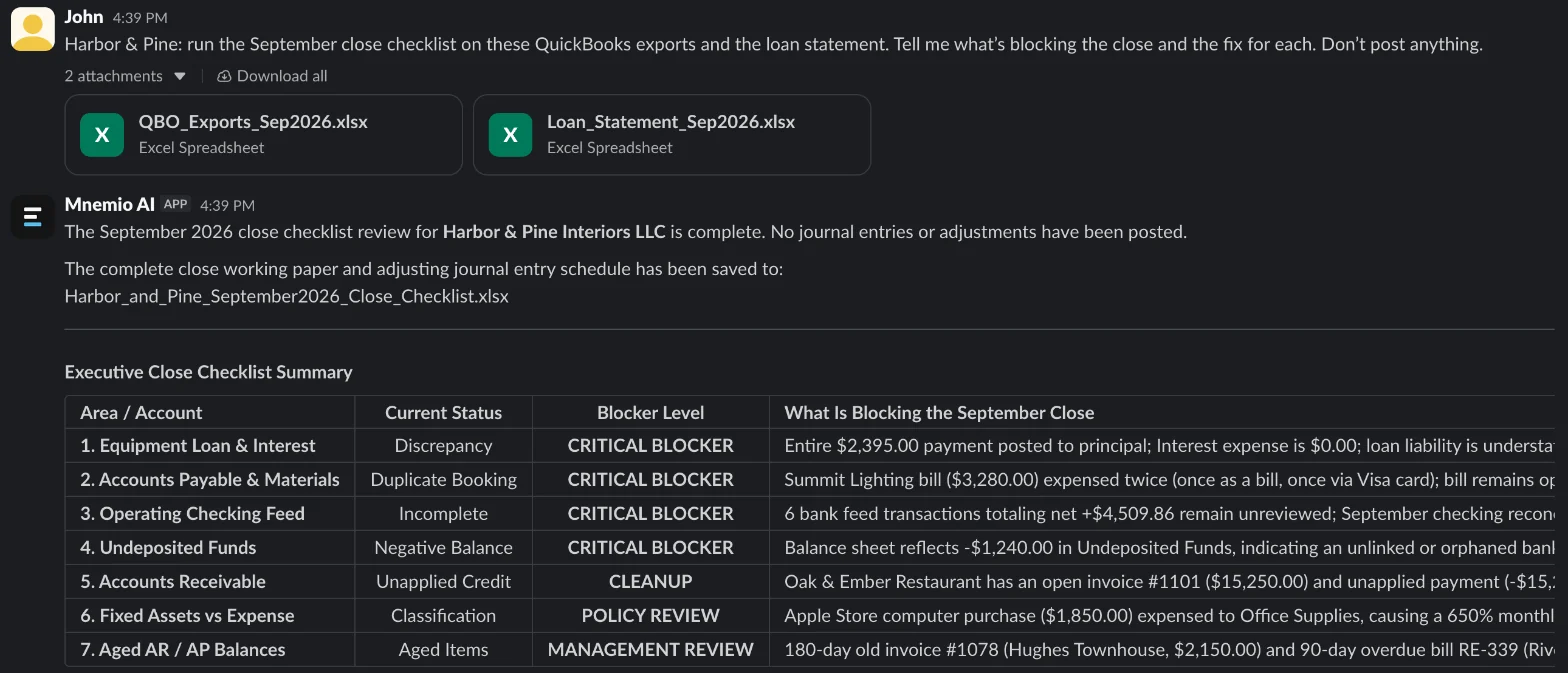
What the agent did
- Went through the checklist in order: bank feed, reconciliations, AP, AR, balance sheet, P&L.
- Compared the loan balance in QuickBooks with the lender's statement and traced the difference to interest.
- Matched card transactions against open bills and found one paid twice in effect.
- Checked AR for payments that were received but not applied.
- Compared each P&L line with August and flagged large moves.
- Proposed three adjusting journal entries, without posting them, and saved the close working paper as an Excel workbook.
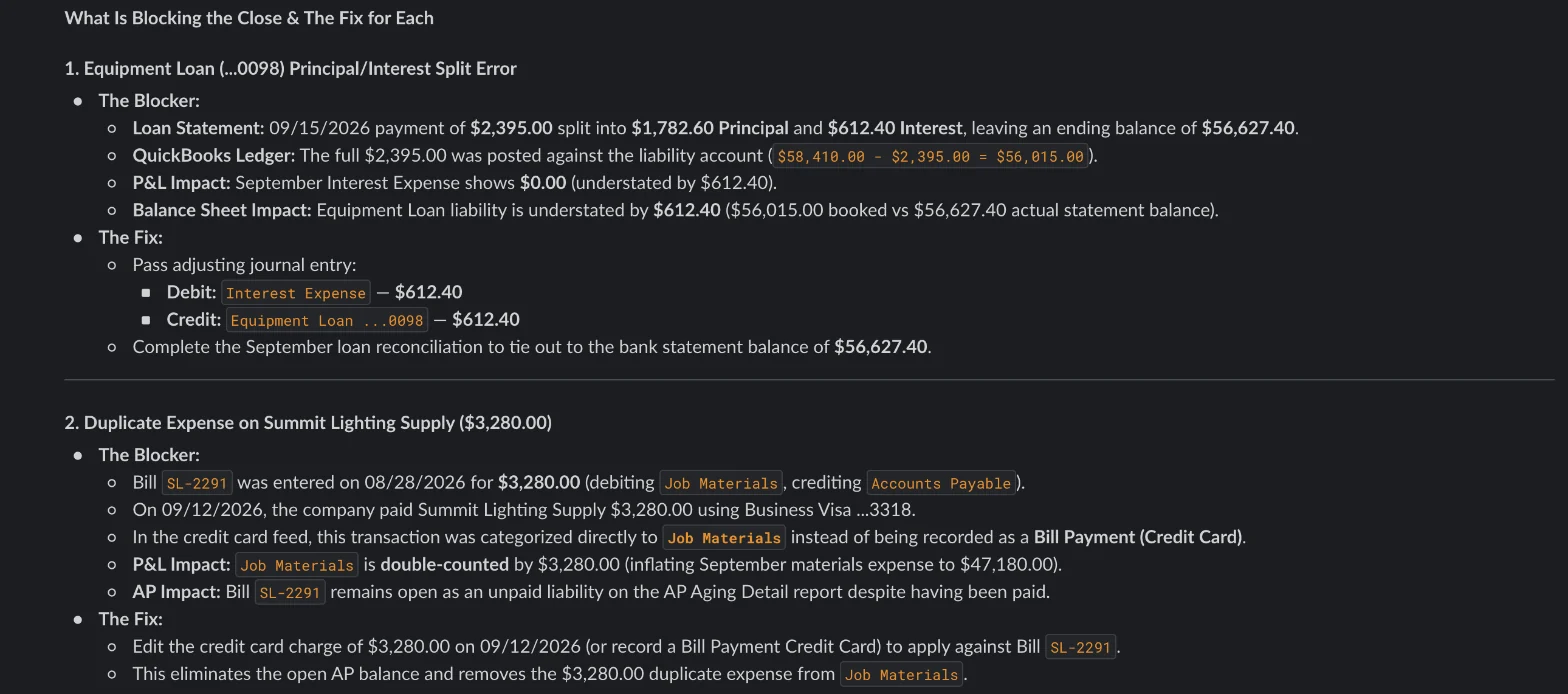
What it found
| Blocking item | Amount ($) | Proposed fix |
|---|---|---|
| Six bank-feed lines still for review | Categorise or match them | |
| Operating checking not reconciled for September | Reconcile to the statement | |
| Loan payment posted all to principal | 612.40 | Dr Interest Expense, Cr Equipment Loan |
| Bill SL-2291 open, but paid by card and coded to Job Materials | 3,280.00 | Match the card charge to the bill |
| Customer payment not applied to invoice 1101 | 15,250.00 | Apply the payment |
| Undeposited Funds negative | -1,240.00 | Find the unmatched deposit before closing |
| Laptop expensed to Office Supplies | 1,850.00 | Move it to Equipment if over the capitalisation limit |
What you still check
- Each proposed journal entry before anyone posts it.
- Old items the agent can only flag, such as a bill more than 60 days past due: was it paid outside QuickBooks?
- The closing date and who may change a closed period.
Questions accountants ask
Can the agent work inside QuickBooks Online?
It works from the reports you export, or in its own browser window after you sign in yourself. It asks before it changes anything, and every change is logged.
What does it need from me?
The standard reports: bank feed items, reconciliation reports, AP and AR aging, the balance sheet, the P&L by month, and any loan statements.
Can it do the same for Xero or Zoho Books?
Yes. The checklist is the same; only the report names change.
Hand this job to an agent
Bring one of your own files to a 30-minute call and watch an agent do it.
Book a 30-min demo