Short answer: Before filing GSTR-1, compare three sources: your sales register, the e-invoice data that auto-populates GSTR-1, and the sales and output tax ledgers in the trial balance. Every IRN should be in your books, B2B credit notes need an IRN, and tax heads must agree. An AI agent can run this three-way check from one message.
E-invoicing means much of GSTR-1 is filled in before you open it. That makes the pre-filing check more important, not less: an invoice that exists on the IRP but not in your books still reaches the return.
Here is the manual method from a recent Tally tutorial, then the same check done by an AI agent in Slack.
The tutorial this is based on
GSTR-1 RETURN FILING | GSTR1 RETURN FROM TALLY | E INVOICE GSTR1 RETURN FROM TALLY | ONLINE GSTR1 by Tally Home & Institute, published 5 October 2026 (in Hindi). It covers each reconciliation in order, from last period's open items to the final tie-out by tax head.
How do you reconcile GSTR-1 with your books?
- Clear anything left open from the previous period first, using TallyPrime's GST reconciliation.
- Compare GSTR-1 sales with the Sales account in the P&L for the month.
- Reconcile the output IGST, CGST and SGST ledgers with the tax in the return.
- Download the return data into TallyPrime and compare the e-invoice data with your vouchers. Invoices and credit notes with an IRN are auto-populated in GSTR-1.
- For documents not yet reported, export the e-invoice JSON from TallyPrime and upload it on the portal.
- Do the final tie-out: portal GSTR-1 against Tally, tax head by tax head.
Where it usually goes wrong
- An invoice generated on the IRP but never entered in Tally. It reaches GSTR-1 anyway, so the books under-report sales.
- A B2B credit note entered in Tally without an IRN.
- A one-character typo in a customer's GSTIN.
- CGST and SGST charged on a sale to another state.
- A journal entry to Sales, for example for scrap, that never reaches the sales register.
- Reducing e-invoice values in GSTR-1 to match the books. The tutorial warns against this; fix the books or the e-invoice instead.
How an AI agent does it from Slack
We gave the agent three files for a made-up manufacturer, Tapti Polymers: October's Tally sales register (47 documents), the e-invoice data from the portal and the trial balance. We planted six problems. Every company, name, tax number and amount in these files is made up. The agent works in Slack, where it shows up as Mnemio AI, because Accountant AI is built on Mnemio AI.
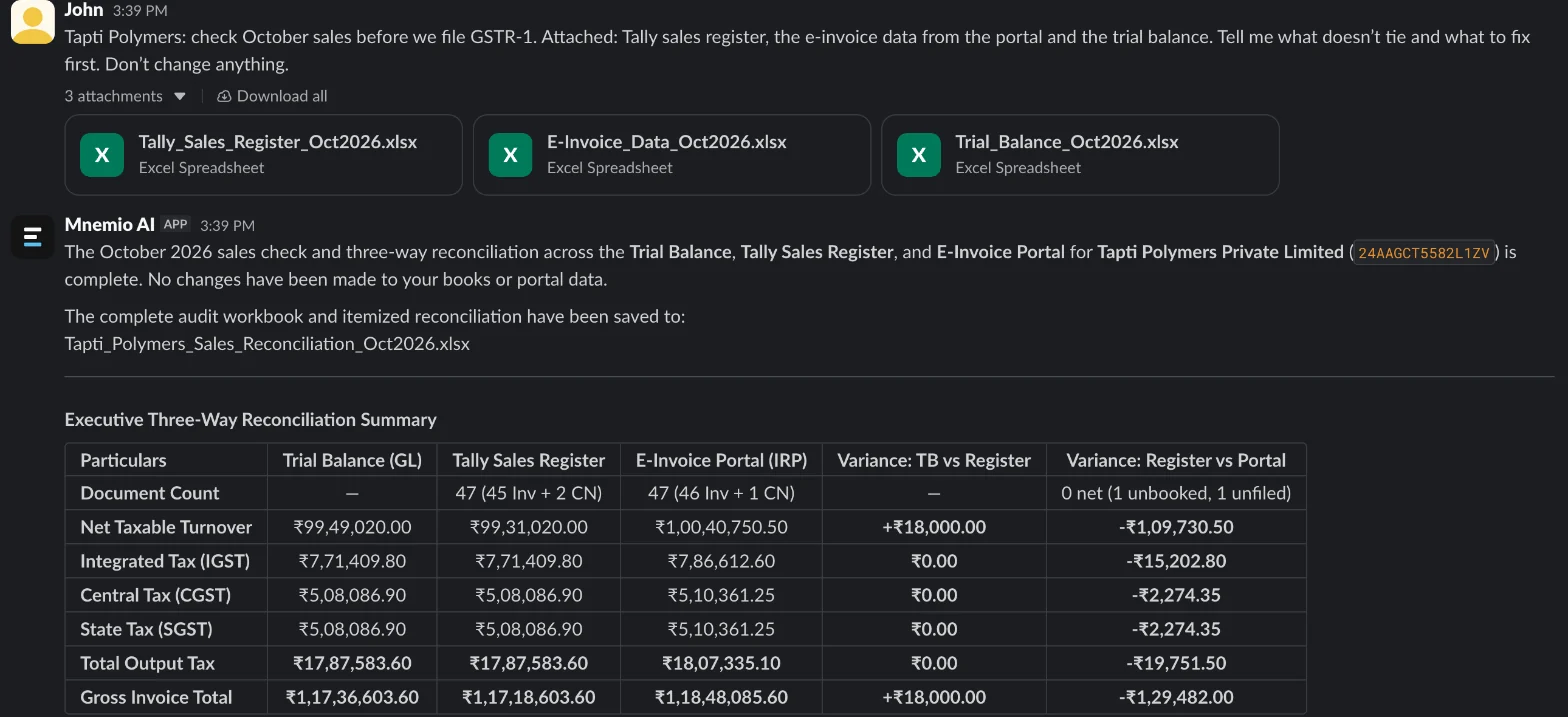
What the agent did
- Totalled all three sources: taxable value of ₹99,49,020 in the trial balance, ₹99,31,020 in the sales register and ₹1,00,40,750.50 in the e-invoice data.
- Matched documents by number between Tally and the e-invoice data, then compared GSTIN, place of supply, taxable value and each tax head.
- Explained the ₹1,09,730.50 gap between the register and the e-invoice data item by item.
- Checked the output tax ledgers in the trial balance against the register, and traced the ₹18,000 sales difference to an entry posted outside the sales register.
- Ranked the fixes and listed them in order, without changing the books.
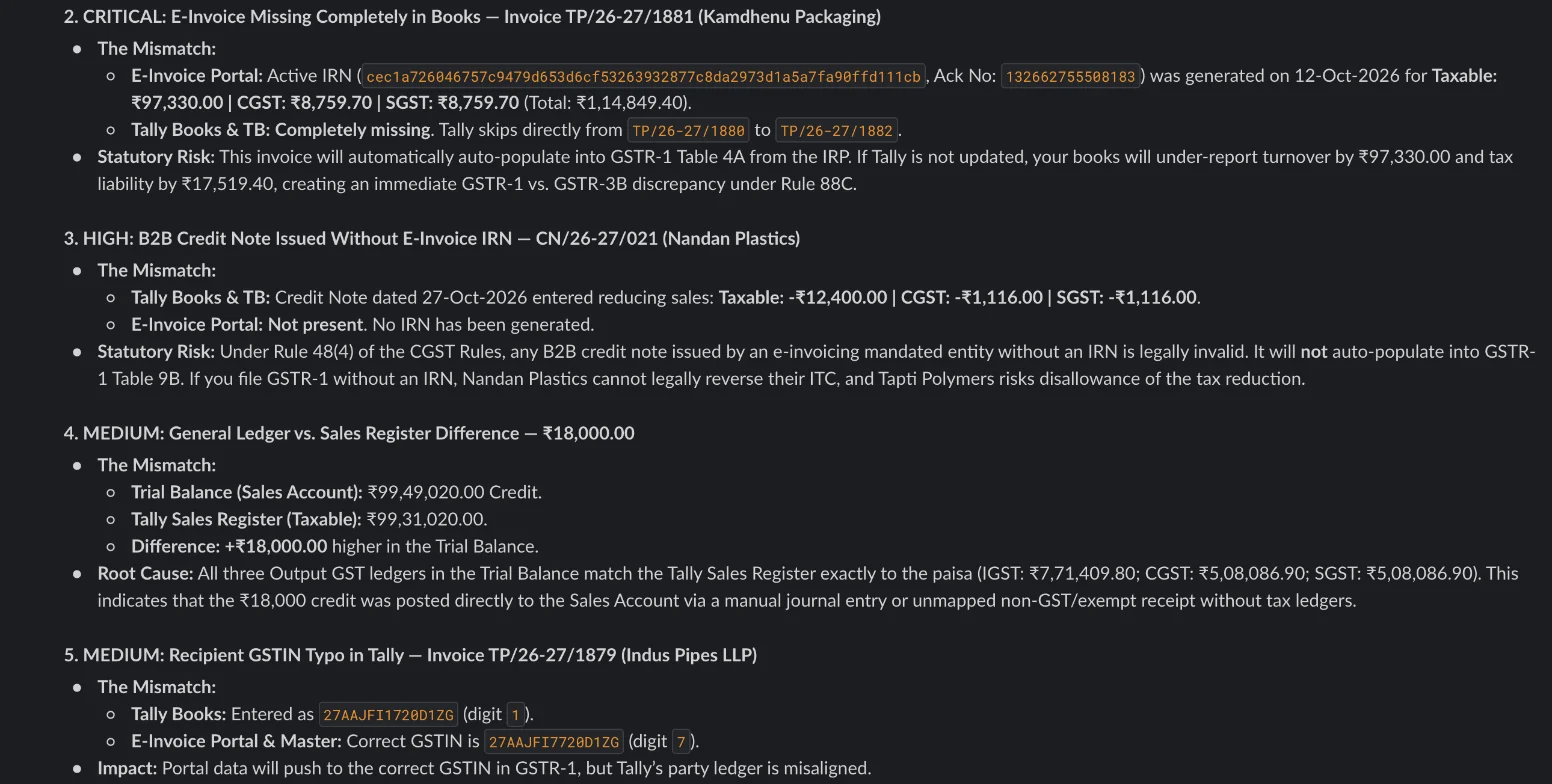
What it found
| Problem | Document | Amount (₹) | Fix |
|---|---|---|---|
| Has an IRN but is missing in Tally | TP/26-27/1881 | 97,330.00 taxable | Book the invoice in Tally |
| B2B credit note without an IRN | CN/26-27/021 | 12,400.00 taxable | Generate the e-invoice for the credit note |
| Customer GSTIN typo in Tally | TP/26-27/1879 | Correct the party master | |
| CGST and SGST on an inter-state sale | TP/26-27/1876 | 15,202.80 tax | Change the place of supply and charge IGST |
| Sales in the trial balance higher than the register | Journal entry | 18,000.00 | Check whether GST applies and how it is reported |
| Rounding | TP/26-27/1896 | 0.50 | Immaterial; note it |
What you still check
- Whether the ₹18,000 entry is a taxable scrap sale. The agent flags it; you decide.
- The corrected GSTIN, against the customer's registration.
- The place of supply on the inter-state invoice, before the return goes in.
Questions accountants ask
Why compare e-invoice data and not just GSTR-1?
Because e-invoices flow into GSTR-1 on their own. If an invoice exists on the IRP but not in your books, the return includes it and your books don't.
Can the agent download the data from the GST portal?
You sign in to the portal yourself, in the agent's browser window. After that it can download what it needs. It asks before it changes or files anything.
Does it only work with Tally?
No. It works from exports, so a sales register from Zoho Books, Busy or an ERP works the same way.
Hand this job to an agent
Bring one of your own files to a 30-minute call and watch an agent do it.
Book a 30-min demo