Short answer: To get ready for UAE e-invoicing, make the company name, TRN and address match the VAT certificate, give every UAE business customer a 15-digit TRN and an emirate, map every unit to a UN/ECE code, give every discount a reason and code exports as zero-rated. Then fix or resend anything pending. An AI agent can check the masters and invoices and list what would be rejected; your Tally partner and your ASP make the changes.
Under UAE e-invoicing, an invoice with a bad TRN or an unmapped unit is rejected before it reaches the buyer. Most of the fixes are in the masters, not the invoices.
Here is the readiness checklist from a recent TallyPrime webinar, then an agent checking a Dubai distributor's masters and October invoices, and the two follow-ups it needed.
The tutorial this is based on
How to Prepare for UAE e-Invoicing with TallyPrime? by #VIDYA TV, published 26 July 2026 (in English). A TallyPrime partner webinar: the timeline, the flow through the service providers, then Tally's exception reports. We took the readiness checklist from it and checked the dates and rules against the Ministry of Finance decisions and the PINT AE validation rules.
How do you get Tally ready for UAE e-invoicing?
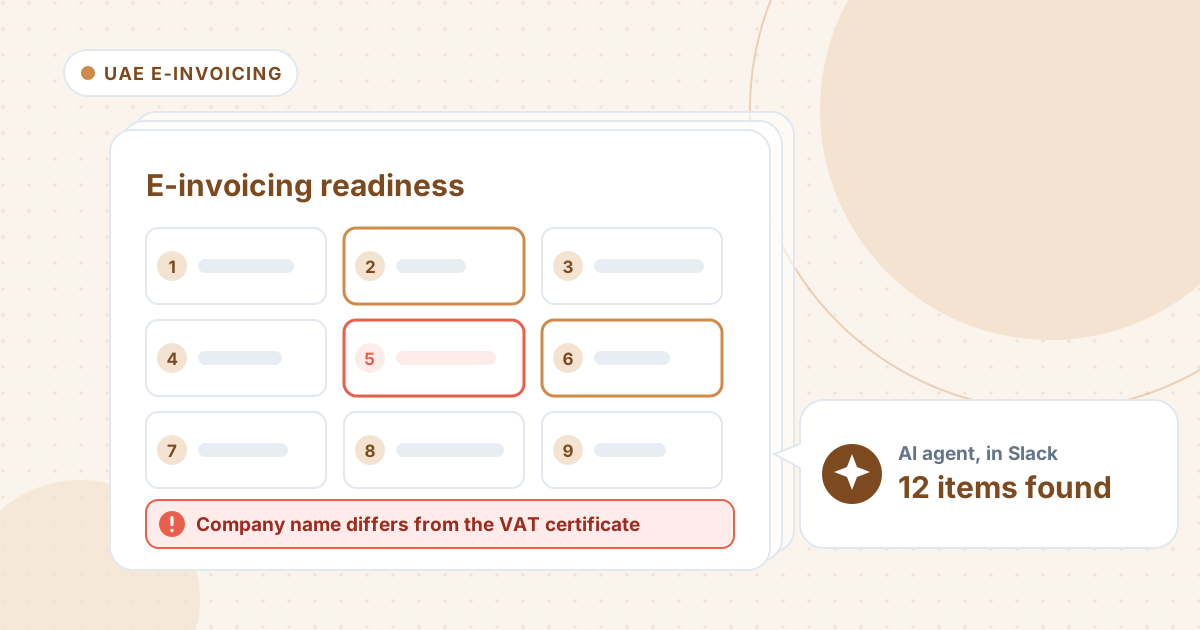
- Confirm your phase. Revenue of AED 50m or more: appoint an accredited service provider (ASP) by 30 October 2026 and go live on 1 January 2027. Under AED 50m: ASP by 31 March 2027, live 1 July 2027. Check the Ministry of Finance for the current dates.
- Company master: the name, TRN and address exactly as on the VAT certificate. The seller name on every e-invoice comes from here.
- Customer master: every UAE business customer needs a 15-digit TRN (starting 1, ending 03), an address line, a city and an emirate. Export customers have no UAE TRN.
- Stock items: map every unit to a UN/ECE Rec 20 code, for example kg to KGM, litre to LTR, piece to H87 or C62. Ask your ASP which piece code it expects.
- Ledgers: code exports as zero-rated, with the country the goods go to.
- Invoices: give every discount a reason or reason code, never type over the computed VAT, and never edit an invoice after its e-invoice is generated. Issue a credit note and a new invoice instead.
- Run Tally's exception reports and send anything pending. Once live, invoices go to your ASP within 14 days (Ministerial Decision No. 243 of 2025; check for later changes).
Where it usually goes wrong
- The company name abbreviated in Tally.
- A customer TRN with 14 digits, or none.
- An emirate missing from a customer's address.
- Units like kgs, Ltr and pcs with no code.
- A discount with no reason.
- VAT typed over by hand.
- An export coded standard-rated. It passes validation, but it is still wrong.
- A TRN on the invoice that differs from the master by two swapped digits. That passes too.
- Invoices left pending for weeks.
How an AI agent does it from Slack
We gave the agent four files for a made-up Dubai food distributor, Zafran Pearl General Trading: the company profile, customer master and stock items from Tally, and October's 72 invoices with their status in the ASP test run. Every company, name, tax number and amount in these files is made up. The agent works in Slack, where it shows up as Mnemio AI, because Accountant AI is built on Mnemio AI.

What the agent did
- Checked the company master, the customer master, the stock items and all 72 October invoices, and saved its findings as a workbook.
- Found the company name that doesn't match the VAT certificate, two customers with 14-digit TRNs, one with no TRN, one with no emirate, and 11 stock items whose units have no code.
- Listed the 18 invoices that would be rejected, including VAT keyed AED 137.40 short and a 2% discount with no reason, and flagged an invoice edited after its e-invoice was generated.
- Got several things wrong in its first reply: its totals didn't tie to the invoice file, it suggested 15-digit TRNs it had made up, it labelled some rules with IDs from another rule set, it called the Muscat export fine, it missed a TRN that differs from the master, and it gave an invented reason for three invoices pending since 1 October.
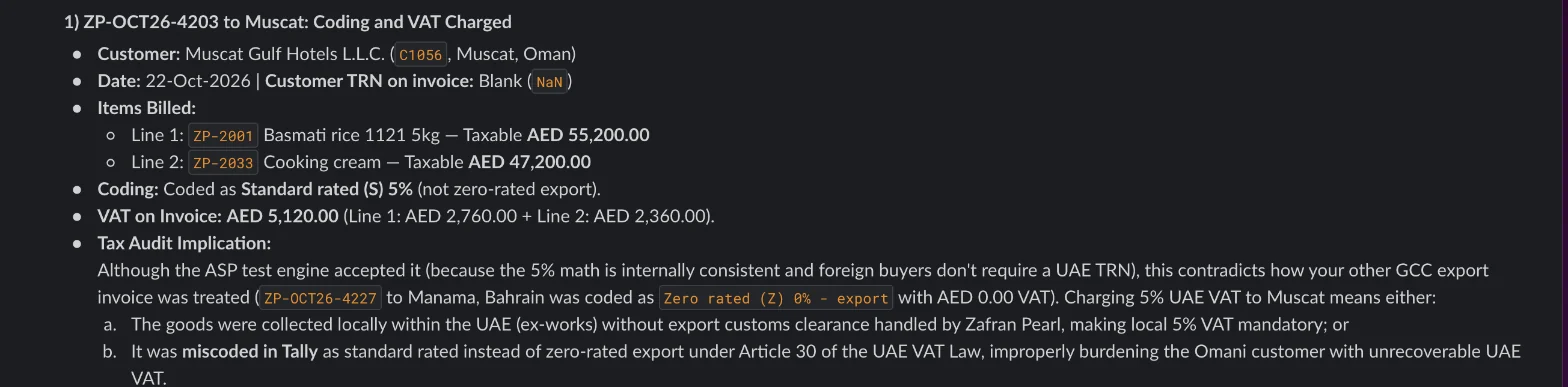
- Asked five questions, it found the Muscat invoice coded standard-rated with AED 5,120 of VAT, found the swapped TRN digits on ZP-OCT26-4159, said TRNs must come from the customer's VAT certificate, put the three old invoices well past the 14-day window and placed the company in the first phase, live 1 January 2027.
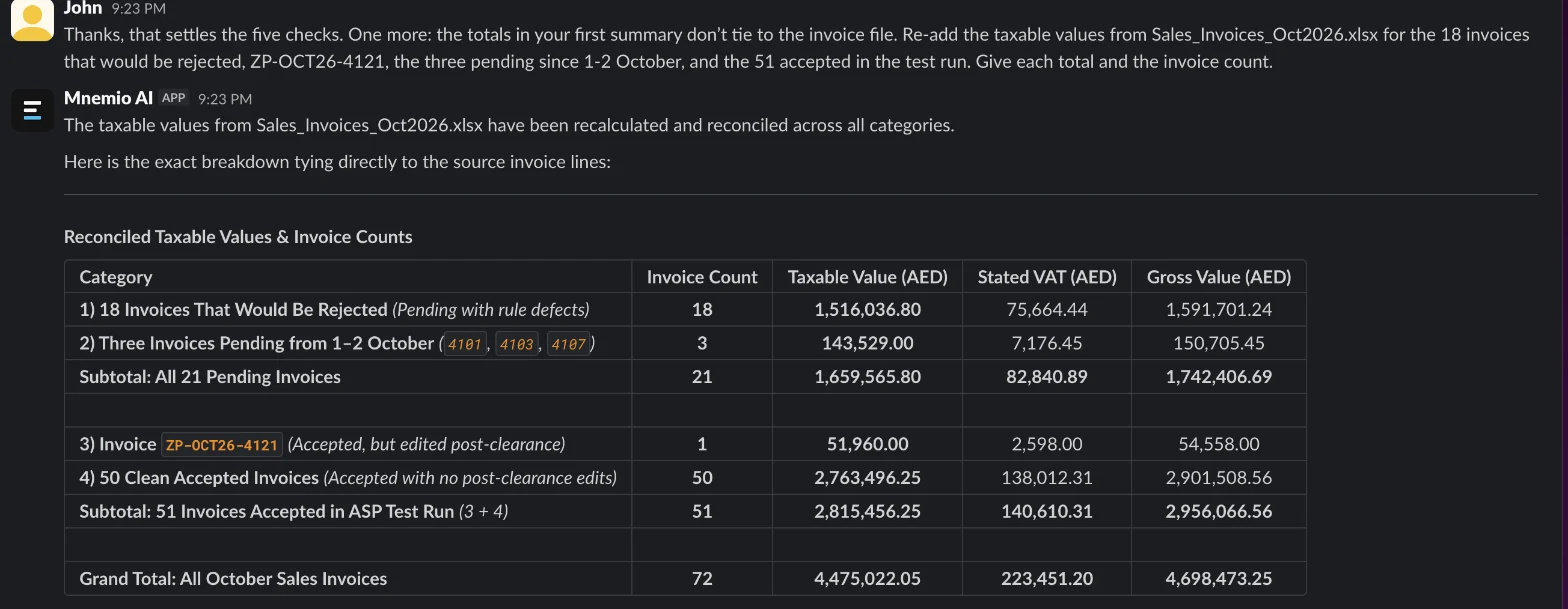
- Asked to re-add its totals, it gave the right figures: 18 invoices, AED 1,516,036.80, and 21 pending in all.

What it found
| What the agent found | Invoices | Where it's fixed |
|---|---|---|
| Company name differs from the VAT certificate | All | Company master |
| Customer TRN with 14 digits (2 customers) | 7 | Customer master |
| Customer with no TRN | 1 | Customer master |
| Customer with no emirate | 2 | Customer master |
| Units with no code (11 items) | 9 | Stock items |
| VAT keyed AED 137.40 short | 1 | Invoice |
| Discount with no reason | 1 | Invoice |
| Would be rejected (AED 1,516,036.80) | 18 | |
| Export to Oman coded standard-rated (VAT AED 5,120) | 1 | Accepted in the test run |
| TRN differs from the master | 1 | Accepted in the test run |
| Edited after the e-invoice was generated | 1 | Credit note and new invoice |
| Pending since 1-2 October | 3 | Send now |

What you still check
- The unit codes, with your ASP: H87 or C62 for pieces.
- Every customer TRN, from the customer's VAT certificate. The agent's first reply suggested TRNs it had made up.
- The Muscat export: keep the exit evidence, recode it as zero-rated and, once live, cancel it with an electronic credit note and reissue it.
- Your phase and dates, against the Ministry of Finance's current decisions. The timeline has moved once already.
- Any rule ID the agent quotes, against the PINT AE validation rules. Its first reply used IDs from another rule set.
- The changes in Tally, which your Tally partner makes. The agent doesn't send e-invoices or act as an ASP.
Questions accountants ask
When does UAE e-invoicing start?
For businesses with revenue of AED 50m or more, on 1 January 2027, with an ASP appointed by 30 October 2026. Businesses under AED 50m follow on 1 July 2027, with an ASP by 31 March 2027. Check the Ministry of Finance for the current dates.
Can I edit an e-invoice after it is issued?
No. Issue an electronic credit note and a new invoice. The agent flagged one invoice edited in Tally after its e-invoice was generated.
Does the agent send e-invoices?
No. It checks the masters and invoices and lists the fixes. Your Tally partner makes the changes and your ASP sends the invoices. It asks before it changes or sends anything.
Hand this job to an agent
Bring one of your own files to a 30-minute call and watch an agent do it.
Book a 30-min demo