Short answer: A debtors ageing report lists each unpaid invoice by how long it is overdue, grouped into buckets such as not due, 1 to 30, 31 to 60, 61 to 90 and over 90 days. Adjust unapplied receipts and credit notes first, or customers look more overdue than they are. An AI agent can build the ageing and draft the reminders.
The ageing report is easy to build and easy to get wrong. The formulas work; the data underneath is the problem: receipts not set off against bills, credit notes not adjusted and advances that look like payments.
Here is the method from a recent Excel tutorial, then an agent doing the month's ageing and the reminders.
The tutorial this is based on
Create an Automatic Aging Report in Excel | Perfect for Accountants by PowerEx by Jitendra, published 1 November 2026 (in Hindi). A short build with the classic formulas and a PivotTable.
How do you make a debtors ageing report in Excel?
- Put the invoices in an Excel Table: customer, invoice number, invoice date, due date, amount and amount received.
- Outstanding = amount minus received. If it is zero or less, mark the invoice as paid.
- Mark each unpaid invoice as overdue if the due date is before the report date, and work out the days overdue.
- Give each invoice a bucket (not due, 1-30, 31-60, 61-90, over 90) with an approximate-match lookup against a small bucket table.
- Highlight overdue rows with conditional formatting.
- Build a PivotTable with customers in rows, buckets in columns and outstanding amounts in values. Refresh it when new invoices come in.
Where it usually goes wrong
- A receipt on account that was never set off against bills, so the customer looks overdue.
- A credit note not adjusted against the invoice.
- An advance for a future order treated as payment of old bills.
- A disputed invoice included in a reminder, which damages the relationship.
- Ageing by invoice date when the customer's credit terms say due date.
How an AI agent does it from Slack
We gave the agent three files for a made-up electrical distributor, Rudra Electricals: sales invoices from April to October, unadjusted receipts and credit notes, and customer credit terms with contacts. Every company, name, tax number and amount in these files is made up. The agent works in Slack, where it shows up as Mnemio AI, because Accountant AI is built on Mnemio AI.
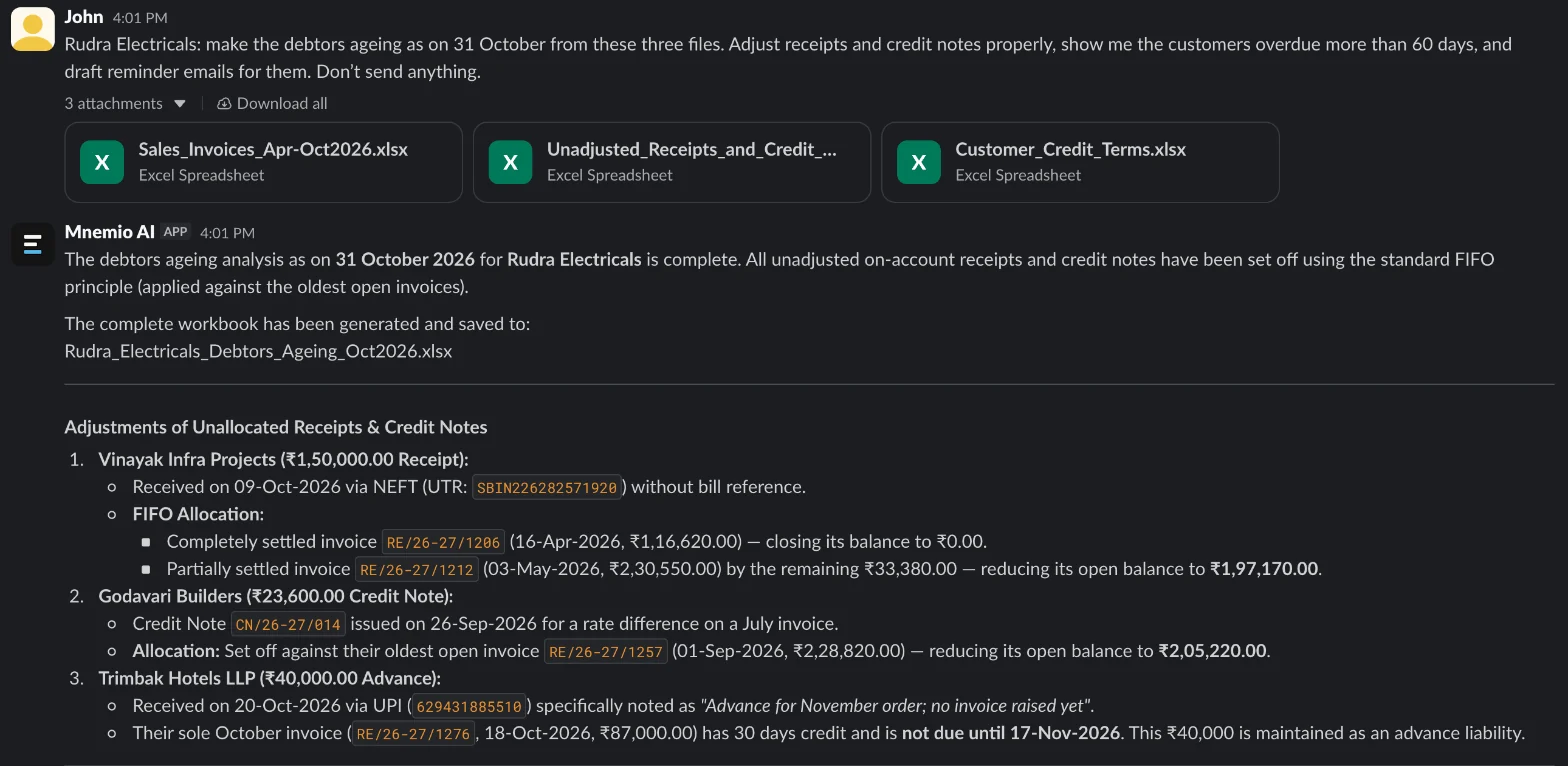
What the agent did
- Worked out the due date of every invoice from each customer's credit days.
- Aged every unpaid invoice into buckets as on 31 October.
- Went through the unadjusted receipts and credit notes and decided how each one should be treated.
- Asked only for the undisputed bills in the reminder to the customer with a disputed invoice, and proposed checking the GRN and issuing a credit note for any verified shortage.
- Drafted reminder emails for the three customers more than 60 days overdue, and did not send them.
- Saved the ageing as an Excel workbook.
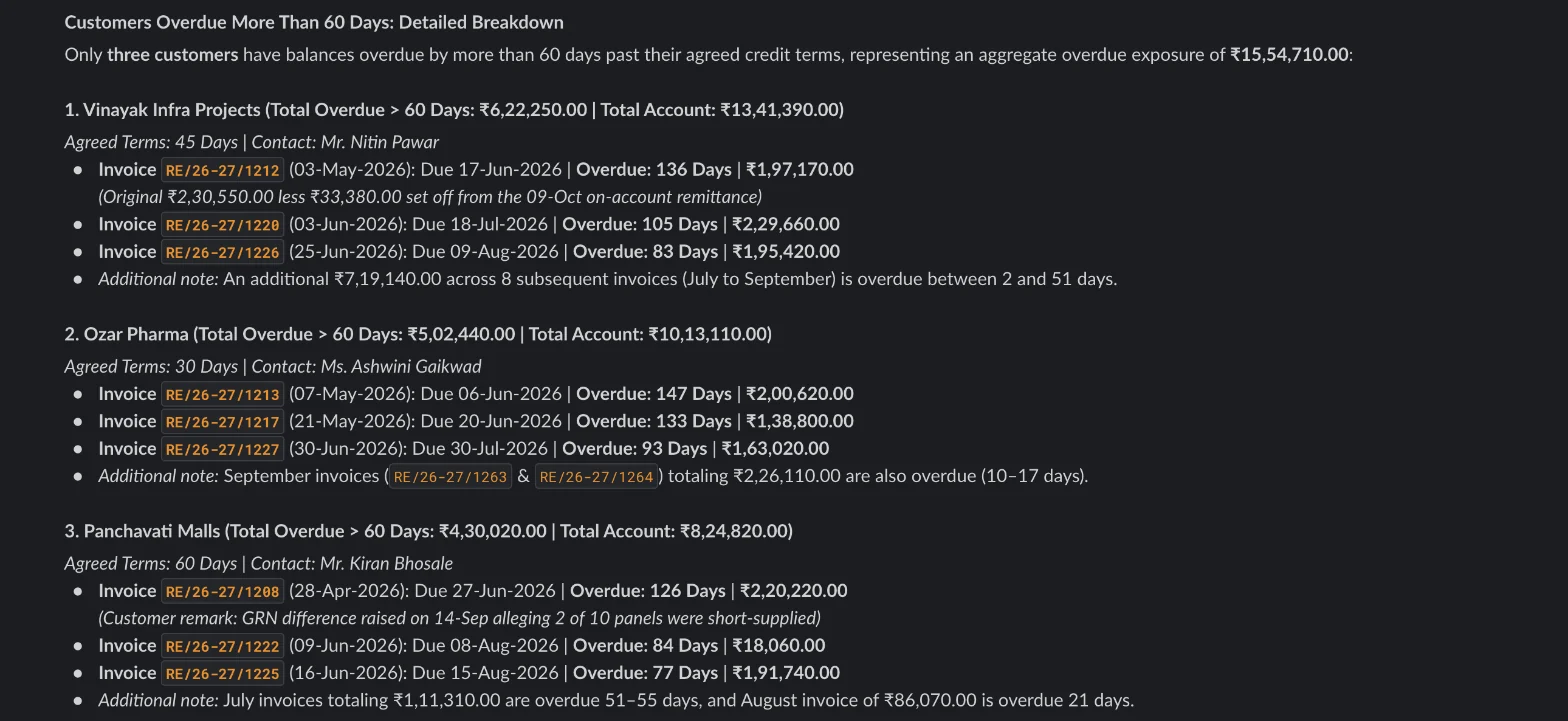
What it found
| Item | Customer | Amount (₹) | Treatment |
|---|---|---|---|
| Receipt on account not set off | Vinayak Infra Projects | 1,50,000.00 | Applied to the oldest bills first |
| Credit note not adjusted | Godavari Builders | 23,600.00 | Set off against the oldest open bill |
| Advance for a future order | Trimbak Hotels LLP | 40,000.00 | Keep as an advance, not a payment |
| Disputed invoice (short supply) | Panchavati Malls | 2,20,220.00 | Not asked for; check the GRN first |
| Overdue more than 60 days | Three customers | 15,54,710.00 | Reminders drafted, not sent |
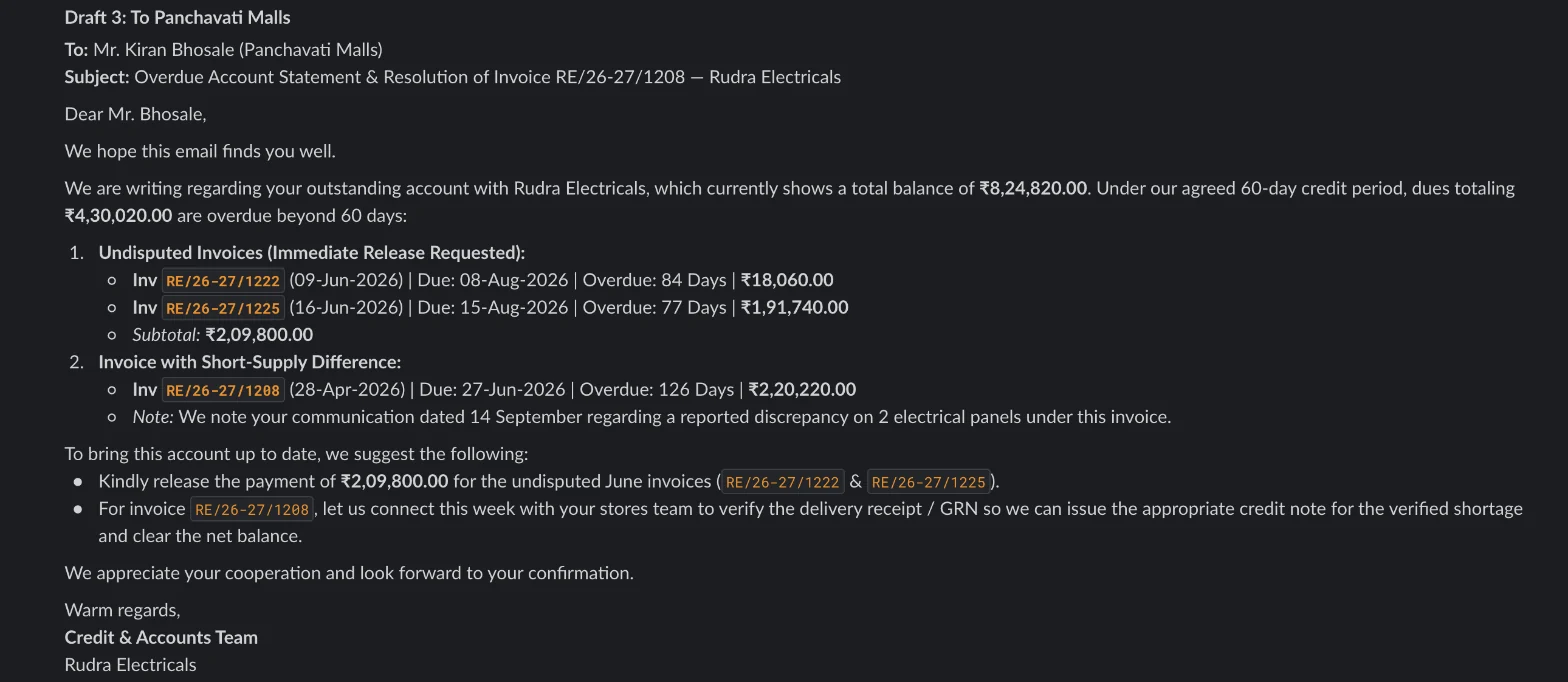
What you still check
- The tone of each reminder, and who it goes to.
- Whether a customer over 90 days needs a call rather than an email.
- Any customer the agent marked as disputed.
Questions accountants ask
Should ageing be by invoice date or due date?
By due date, if you want to know who is late. Ageing by invoice date is useful for spotting slow payers, but it makes customers with long credit terms look overdue.
Can the agent send the reminders?
Only after you approve them. It drafts each email and asks before it sends anything. It can also send them from Slack or WhatsApp once you say yes.
Can it run every week?
Yes. Agents can run on a schedule, so the ageing and the drafts can be waiting for you every Monday morning.
Hand this job to an agent
Bring one of your own files to a 30-minute call and watch an agent do it.
Book a 30-min demo