Short answer: A budget vs actual report sets each month's spend against the budget by department, office and account, with the variance in dollars and percent. Combine the monthly actuals, merge them with the budget on the same keys and add an office lookup. Before you trust it, check for duplicated lines, mismatched account names, spend with no budget line and offices missing from the lookup. An AI agent can do the update and explain who is over budget.
A budget vs actual report is simple arithmetic, but the files behind it rarely line up: lines exported twice, an account renamed, a new office nobody added to the lookup.
Here is how to build one, from a recent tutorial, then an agent updating a firm's October report from four Excel files, and the follow-up it needed.
The tutorial this is based on
Automate an Actuals vs Budget Report in Excel by Kenji Explains, published 4 October 2026 (in English). A 14-minute build: Power Query combines the monthly actuals and merges them with the budget and an office lookup, and a PivotTable shows the variance.
How do you build a budget vs actual report in Excel?
- Put each month's actuals export in one folder and combine them with Data > Get Data > From Folder.
- Set the date column to a date and add the start of the month.
- Group by month, office, department and account, summing the amount, so the keys match the budget's.
- Load the budget and merge it with the actuals on those four keys.
- Drop the months with no actuals yet and add a variance column: budget minus actual.
- Merge an office lookup to add each office's name, region and country.
- Load it to a PivotTable with departments and accounts in rows, add a variance % and slicers for month, office and region. Next month, add the new file and refresh.
Where it usually goes wrong
- Lines exported twice, such as the end of last month at the top of this month's file.
- An account named differently in the actuals and the budget, such as "IT Software" and "Software", so the lines don't match.
- Spend with no budget line, which a merge that starts from the budget silently drops.
- A new office missing from the office lookup, so its spend has no region.
- An annual invoice booked in one month, which makes a department look far over budget.
- Refunds and credits: keep them as negative lines, don't drop them.
How an AI agent does it from Slack
We gave the agent four files for a made-up analytics firm, Halverson & Quill Analytics: the July to September actuals, the October actuals export, the July to December budget and the office lookup. Every company, name, tax number and amount in these files is made up. The agent works in Slack, where it shows up as Mnemio AI, because Accountant AI is built on Mnemio AI.
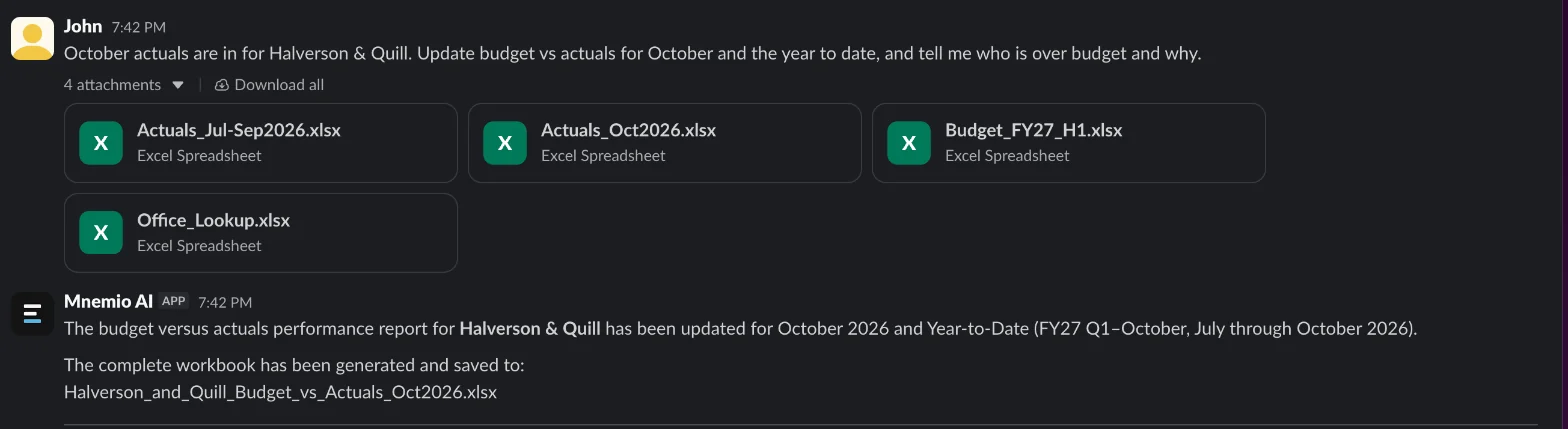
What the agent did
- Found seven September lines at the top of the October export ($28,057.64) that were already in the July to September file, and dropped them.
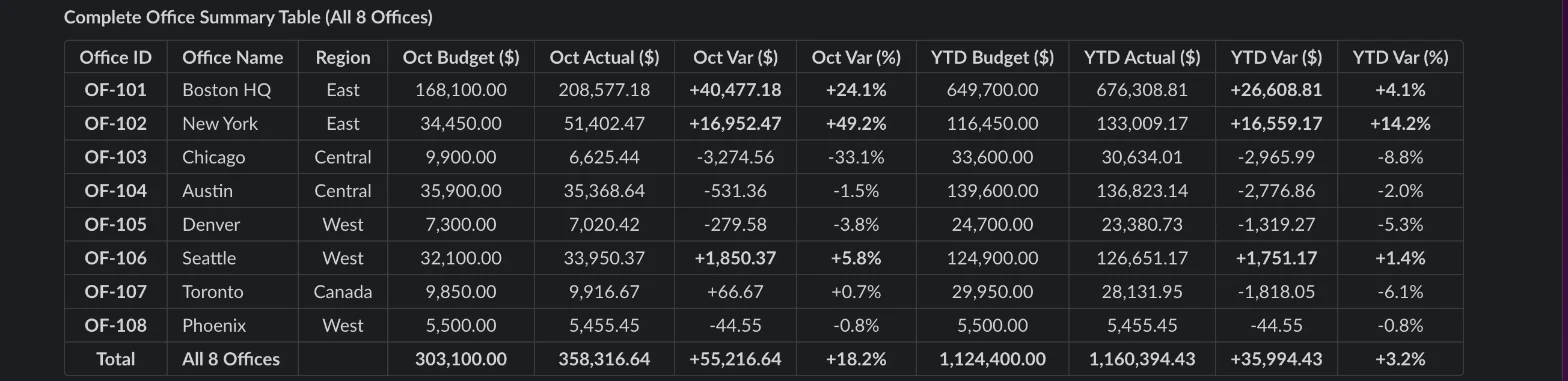
- Reported October at $358,316.64 against a $303,100.00 budget, $55,216.64 (18.2%) over, and the year to date $35,994.43 over, by department and office.
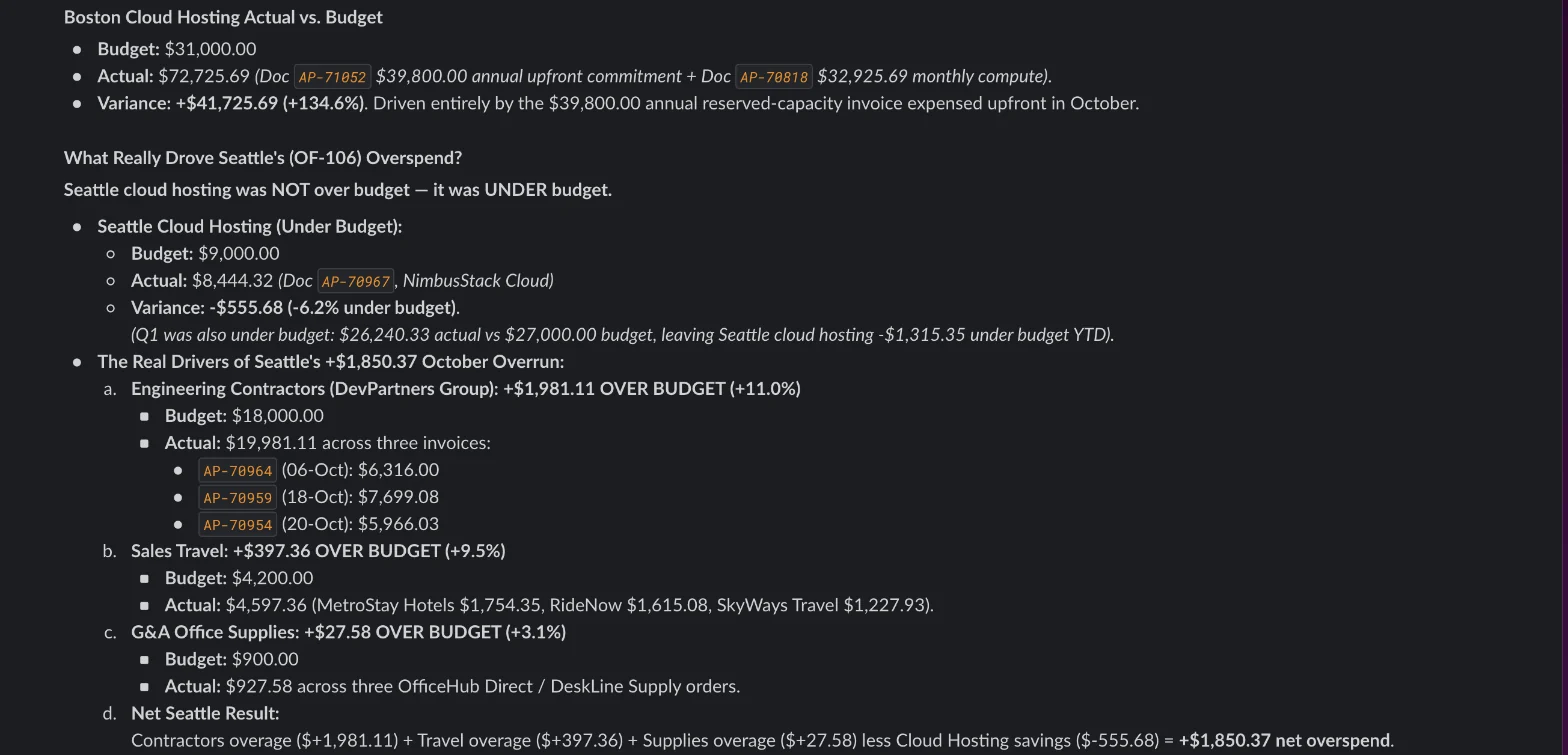
- Traced Engineering's overspend to one invoice, a $39,800 annual cloud commitment booked in full to October, and suggested booking it as a prepayment ($3,316.67 a month).
- Traced most of Marketing's overspend to an $18,500 sponsorship with no budget line, and kept it in the report instead of dropping it.
- Mapped October's "IT Software" to the budget's "Software" and kept a $2,340 airline refund as a credit.
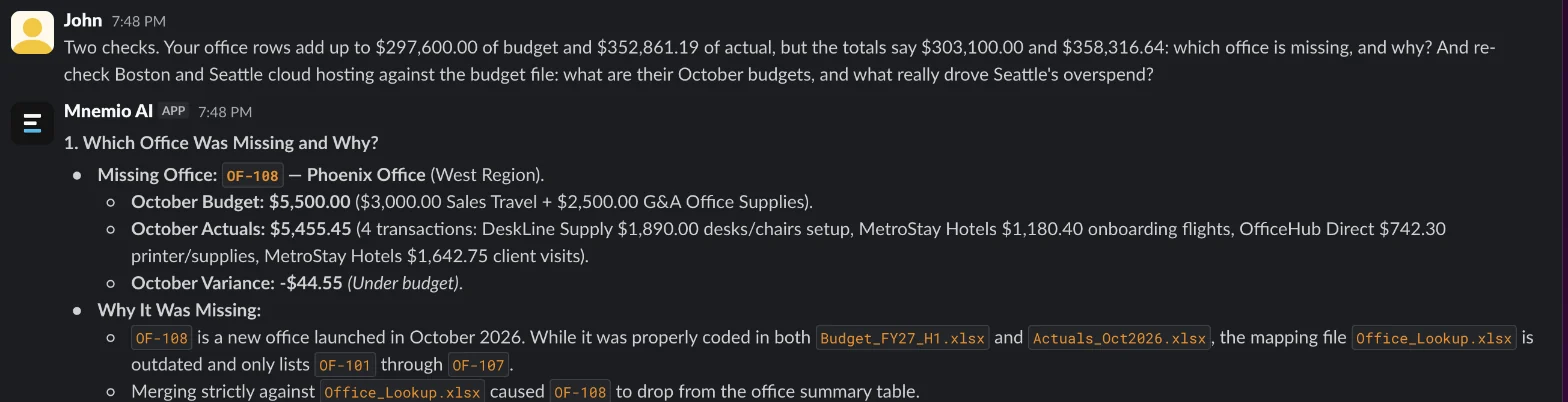
- Got three things wrong in its first reply: its office table left out the new Phoenix office, which isn't in the office lookup; it gave Boston's cloud budget as $28,000 instead of $31,000; and it blamed Seattle's overrun on cloud hosting.
- Asked why the office rows didn't add up and to recheck the cloud budgets, it found Phoenix ($5,500.00 budget, $5,455.45 actual), gave the right budgets and showed Seattle's overrun came from contractors and travel.
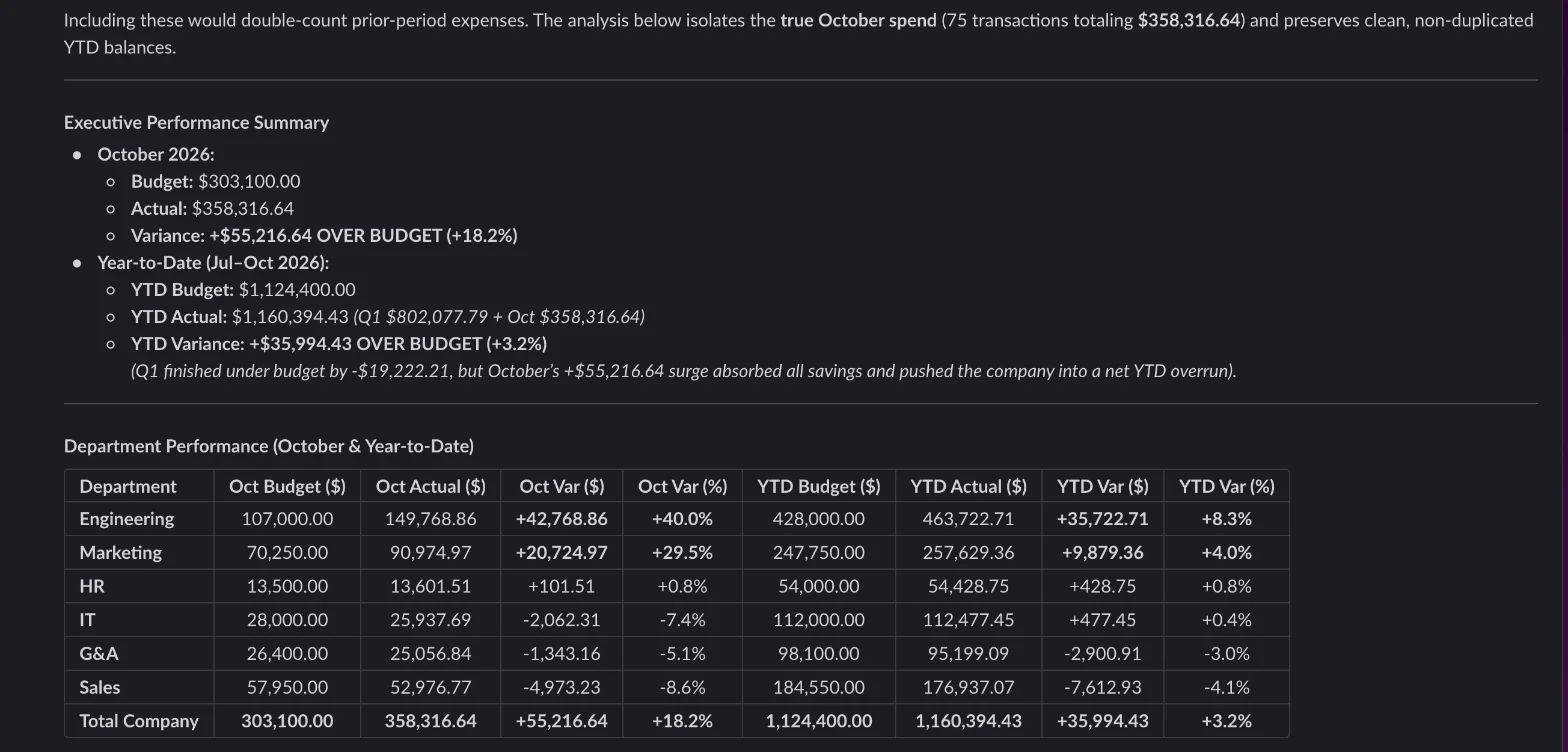
What it found
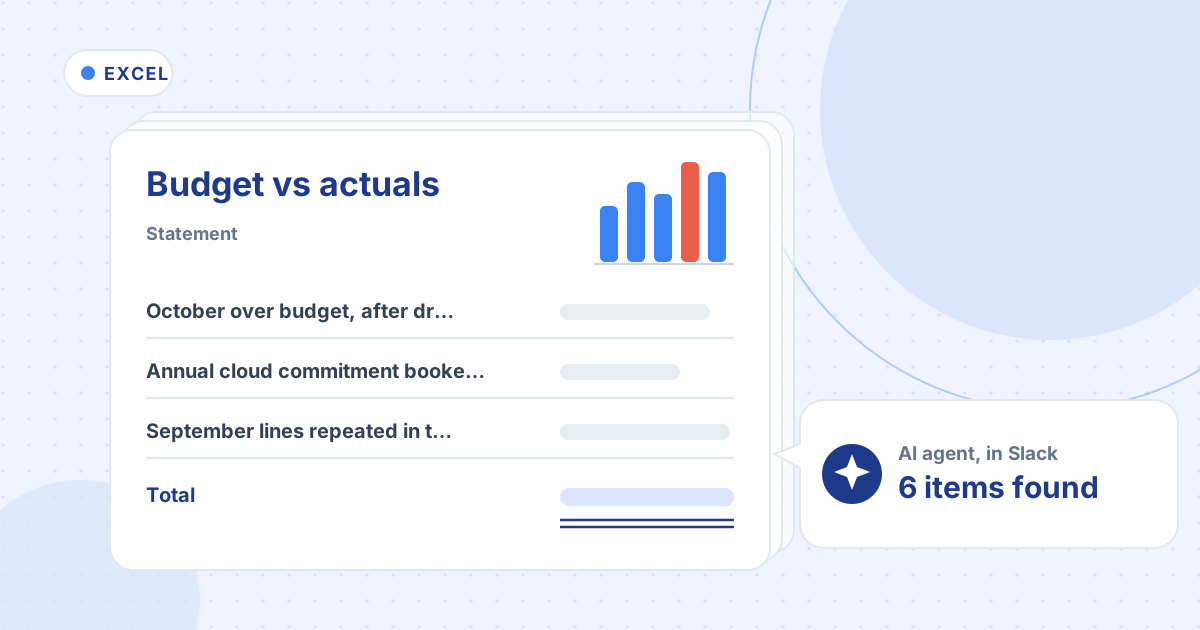
| What the agent found | Amount ($) | Where |
|---|---|---|
| October over budget, after dropping duplicates | 55,216.64 | Whole firm, 18.2% over |
| Annual cloud commitment booked in one month | 39,800.00 | Engineering, Boston |
| September lines repeated in the October file | 28,057.64 | 7 lines, dropped |
| Sponsorship with no budget line | 18,500.00 | Marketing, New York |
| New office missing from the office lookup | 5,455.45 | Phoenix (OF-108) |
| Contractors over budget | 1,981.11 | Engineering, Seattle |

What you still check
- The $39,800 cloud invoice: book it as a prepayment and release $3,316.67 a month, if your policy agrees.
- Who approved the $18,500 sponsorship, and whether it needs a budget line.
- Add Phoenix (OF-108) to the office lookup and confirm its region.
- The agent's explanations against the lines themselves: it called the events overspend catering and production fees, which the lines don't say.
Questions accountants ask
What does a negative variance mean?
It depends on the convention, so state it on the report. The tutorial uses budget minus actual, so negative means overspend. The agent used actual minus budget and labelled every overspend "over budget".
Does the agent replace the Power Query model?
No, they do different jobs. The model refreshes the same report when you add a month's file. The agent reads the files, checks them for duplicates, mismatched names and missing offices, explains the variances and saves a workbook. You can keep the model and have the agent check each month before the report goes out.
Can it run every month?
Yes. Agents can run on a schedule, so the report and the list of who is over budget can be ready when the month's actuals arrive. It asks before changing anything in your files.
Hand this job to an agent
Bring one of your own files to a 30-minute call and watch an agent do it.
Book a 30-min demo