Short answer: To reconcile a vendor statement with your ledger, match the two by invoice number in both directions, list what each side is missing, compare amounts on the bills that match, and turn the differences into a reconciliation that takes your balance to theirs. An AI agent can do the matching and draft the reply to the vendor for you to check.
Vendor reconciliations come round every quarter, before audits and whenever a supplier chases a payment. The method is simple; doing it for twenty vendors is not.
This post takes the vendor reconciliation from a recent Excel tutorial, then gives the same job to an AI agent.
The tutorial this is based on
Top 5 Reconciliation Hacks in Excel | AI + Manual by Accounts Expert, published 19 September 2026 (in Hindi). This post follows Hack 2, the vendor statement against the books. The presenter also reminds viewers to check AI output and keep sensitive data out of public tools.
How do you reconcile a vendor statement with your ledger in Excel?
- Put the vendor's statement and your ledger on two sheets, with the invoice number as the key.
- Use XLOOKUP (or VLOOKUP) to bring the vendor's amount into your sheet against each invoice. Lock the ranges with F4.
- Run the same lookup the other way, from the vendor's sheet into yours, to find what each side is missing.
- Show "Record not found" instead of #N/A, using XLOOKUP's if-not-found argument or IFNA.
- Add a difference column for invoices on both sides with different amounts.
- Turn the differences into a reconciliation statement that starts from your balance and ends at theirs.
Where it usually goes wrong
- A bill in the vendor's statement that you never received, often goods in transit.
- A payment you made at month-end that the vendor has not booked yet.
- Your debit note for returned goods, missing from their statement.
- An invoice the vendor has entered twice.
- Small differences on one bill, such as freight added on their side.
How an AI agent does it from Slack
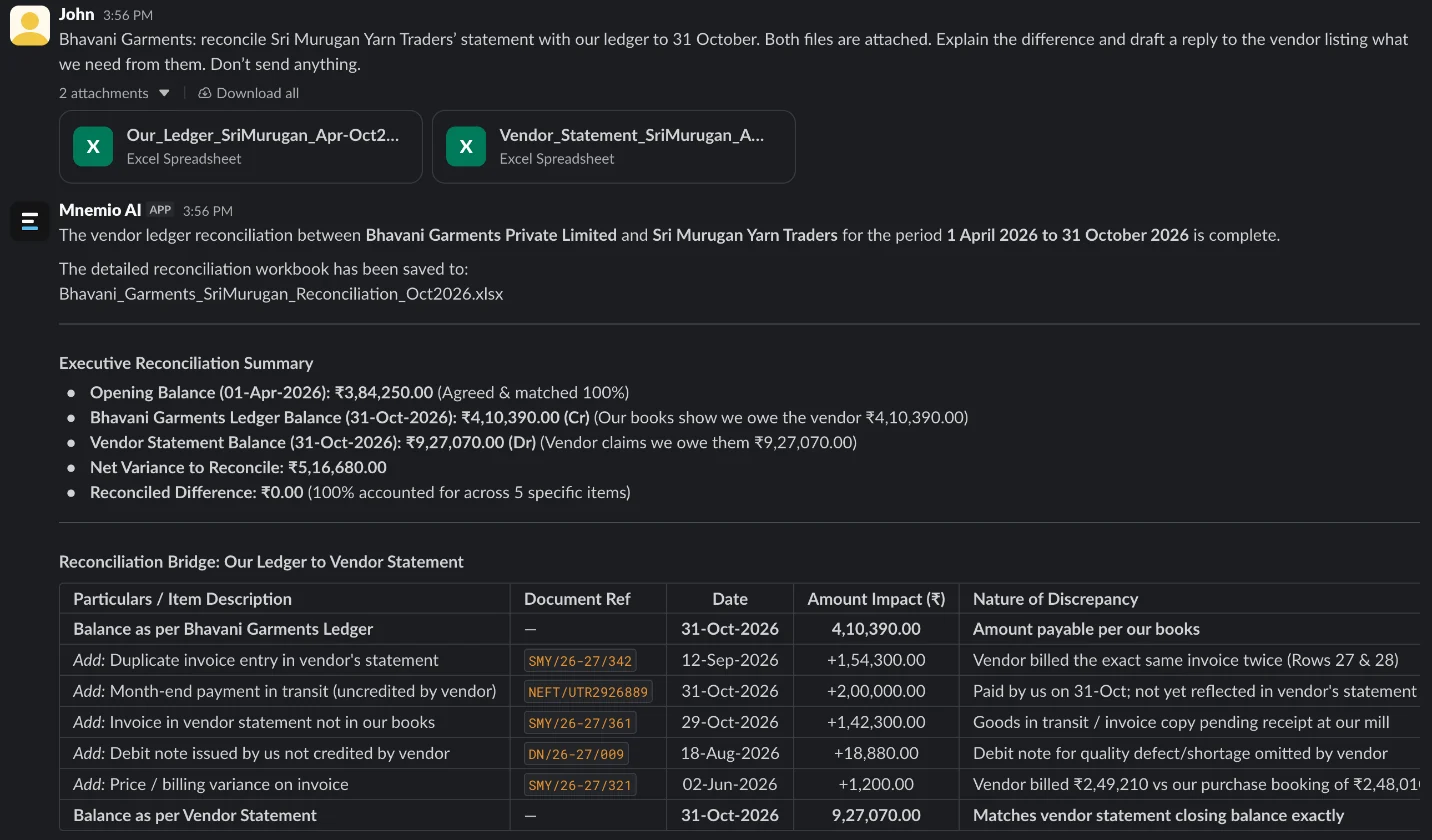
We gave the agent our ledger for a supplier and the supplier's own statement, from April to October, for a made-up garment maker, Bhavani Garments, and its yarn supplier. The two balances were ₹5,16,680 apart. Every company, name, tax number and amount in these files is made up. The agent works in Slack, where it shows up as Mnemio AI, because Accountant AI is built on Mnemio AI.
What the agent did
- Matched the two files by invoice number, in both directions.
- Listed what is only in the vendor's statement, what is only in our books, and amounts that differ.
- Spotted that the vendor has entered one invoice twice.
- Built the reconciliation from our balance to the vendor's balance, with no difference left, and saved it as an Excel workbook.
- Drafted a reply to the vendor, and did not send it.
What it found
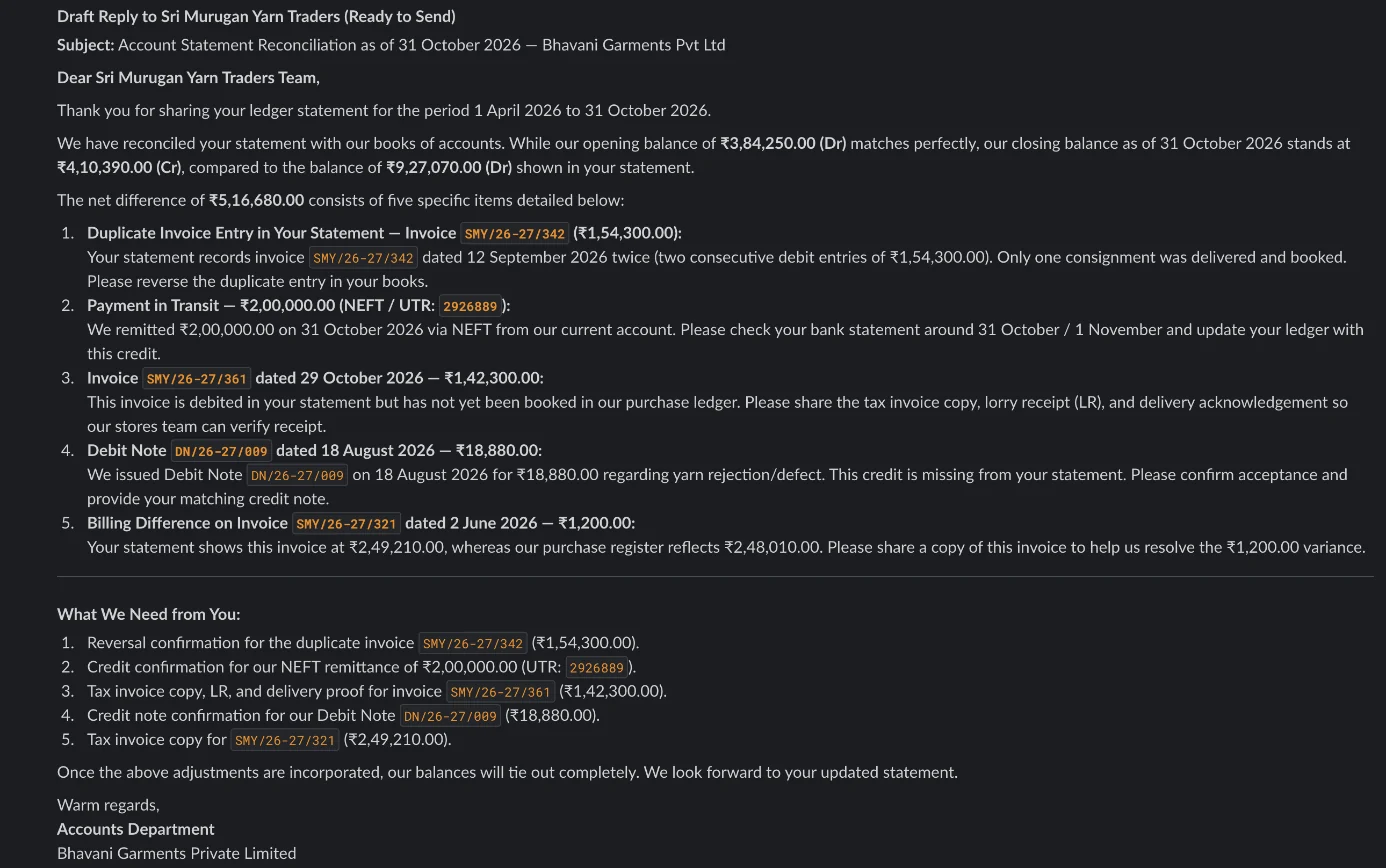
| Item | Amount (₹) | Side | Action |
|---|---|---|---|
| Bill SMY/26-27/361 not in our books | 1,42,300.00 | Vendor only | Get the bill, LR and delivery proof |
| Our payment of 31 October not in their statement | 2,00,000.00 | Ours only | Give the UTR, ask them to credit it |
| Our debit note for rejected yarn not booked by them | 18,880.00 | Ours only | Ask them to book it |
| Bill SMY/26-27/321: 2,49,210 vs 2,48,010 | 1,200.00 | Both | Ask for a copy of the bill |
| Bill SMY/26-27/342 entered twice by the vendor | 1,54,300.00 | Vendor only | Ask them to reverse it |
What you still check
- Whether the ₹1,200 on bill 321 is freight you agreed to pay.
- The draft email, before it goes. The agent never sends anything without your approval.
- Whether the goods for bill 361 were actually received.
Questions accountants ask
Should I use XLOOKUP or VLOOKUP?
XLOOKUP is easier: it looks in any direction and has a built-in "not found" value. VLOOKUP works too, with IFNA around it.
Can the agent do all my vendors at once?
Yes. Put each vendor's statement and ledger in a folder and it works through them one by one, with one reconciliation and one draft reply per vendor.
Will it email the vendor?
Only after you approve the exact text. It drafts the reply and asks before it sends anything.
Hand this job to an agent
Bring one of your own files to a 30-minute call and watch an agent do it.
Book a 30-min demo